Minecraft touch
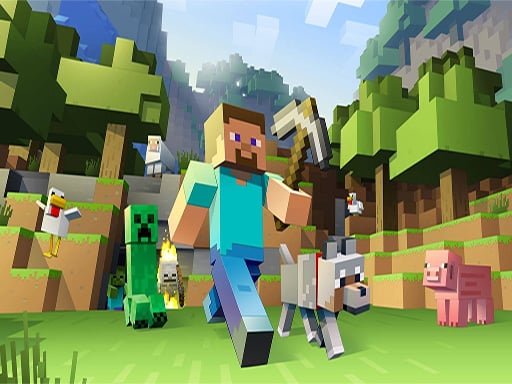
Découvrez des mondes infinis où vous pouvez explorer, construire et inventer sans limite, allant de simples abris de fortune aux plus magnifiques châteaux. Jouez en mode Créatif avec des ressources illimitées ou plongez dans le mode Survie pour creuser jusqu'au cœur de la Terre afin de créer des armes et des armures pour affronter des créatures redoutables. Créez et explorez seul ou avec vos amis, sur mobile ou sur Windows 10. Améliorez votre jeu grâce au magasin où vous pouvez découvrir et obtenir des cartes, des skins et des packs de textures uniques de la communauté. Utilisez les commandes slash pour personnaliser le comportement du jeu, offrir des objets, invoquer des créatures, et bien plus encore. Ajoutez des extensions gratuites pour davantage de personnalisations. Pour ceux attirés par la technologie, modifiez les comportements basés sur les données pour créer de nouveaux packs de ressources. Jouez en multijoueur avec Realms, un serveur privé pour jusqu'à 10 amis sur différentes plateformes, testez gratuitement pendant 30 jours. Rejoignez également des serveurs multijoueurs massifs pour jouer avec des milliers de joueurs, explorez des mondes immenses créés par la communauté, participez à des mini-jeux et faites des rencontres.
What is Minecraft Touch
Minecraft Touch is a mobile version of the popular sandbox video game Minecraft, allowing players to explore, build, and create in infinite worlds. From crafting simple shelters to building magnificent castles, players can unleash their creativity. The game offers two main modes: Creative, which provides unlimited resources for building, and Survival, where players must gather materials, craft weapons and armor, and fend off dangerous creatures. Players can enjoy the game solo or with friends on mobile devices or Windows 10. The game features an in-game store where players can discover and purchase unique maps, skins, and texture packs from the community. With the use of slash commands, players can customize game behavior, give items, summon creatures, and more. Free add-ons are available for further customization. For tech enthusiasts, data-driven behaviors allow for the creation of new resource packs. Multiplayer experiences are enhanced through Realms, private servers for up to 10 friends across different platforms, with a free 30-day trial. Additionally, players can join massive multiplayer servers to explore vast worlds created by the community, participate in mini-games, and meet other players.
Features
Infinite Worlds
Explore endless landscapes filled with caves, forests, oceans, and more, offering countless opportunities for exploration and discovery.
Two Game Modes
{ "Creative Mode": "Unlimited resources to build without limits.", "Survival Mode": "Gather materials, craft tools, and survive against hostile creatures." }
Multiplayer Options
{ "Realms": "Private servers for up to 10 friends, cross-platform compatible.", "Massive Multiplayer Servers": "Join public servers with thousands of players." }
Customization
{ "Slash Commands": "Modify game behavior, summon entities, and more.", "Add-Ons": "Free extensions for additional content and features.", "Resource Packs": "Customize the look and feel of the game with unique textures and sounds." }
In-Game Store
Purchase maps, skins, and texture packs from the Minecraft community.
Player Comments

MinecraftExplorer
Absolutely love the creative mode! The endless resources let me build whatever I can imagine. #MinecraftTouch #CreativeMode

SurvivalPro
Survival mode is so challenging and rewarding. Digging deep into the earth to find materials for weapons and armor is thrilling. #SurvivalMode

PixelArtFan
The skin and texture packs available in the marketplace are amazing. They really enhance the gaming experience. #Customization

RealmsRider
Realms is a great feature for multiplayer. It's awesome to play with friends on a private server. #Multiplayer
WorldBuilder
The ability to create custom worlds with mods is fantastic. It opens up so many possibilities. #Mods

CommunityGamer
Exploring community-made worlds and participating in mini-games is always fun. You never know who you'll meet online. #Community

CommandMaster
Learning how to use commands to customize the game is super useful. You can do so much with just a few slashes. #Commands
TechEnthusiast
Modding the game with data-driven behaviors is an exciting way to dive deeper into Minecraft. #Tech
FAQs
How can I access the Creative mode in Minecraft Touch?
In Minecraft Touch, you can switch to Creative mode where resources are unlimited, allowing you to build without any limitations. You can find this option in the game settings.
Can I play Minecraft Touch in multiplayer mode?
Yes, Minecraft Touch supports multiplayer modes. You can join Realms, a private server for up to 10 friends across different platforms, or explore massive multiplayer servers with thousands of players.
What is the Survival mode like in Minecraft Touch?
Survival mode in Minecraft Touch challenges you to gather resources, craft tools and weapons, and defend yourself against hostile creatures. It requires you to mine deep into the Earth to find valuable materials for survival.
How do I customize my gameplay using commands in Minecraft Touch?
You can use slash commands in Minecraft Touch to customize your gameplay experience. These commands allow you to give items, summon creatures, and more. They can be accessed through the in-game console.
Where can I find unique skins and texture packs for Minecraft Touch?
You can discover and obtain unique skins and texture packs from the community through the Minecraft Marketplace within the game. This adds an extra layer of personalization to your gaming experience.
Is it possible to modify the game behavior in Minecraft Touch?
For those interested in technology, Minecraft Touch allows you to modify game behaviors based on data to create new resource packs. This feature offers extensive customization options for advanced users.
Can I play Minecraft Touch offline?
Yes, Minecraft Touch allows you to play offline as long as you have initially downloaded the game. This means you can continue building and exploring even without an internet connection.
How do I start playing with friends in Minecraft Touch?
To play with friends in Minecraft Touch, you can either invite them to your private Realms server or join public multiplayer servers where you can meet and play with other players from around the world.
Recommended Games
Water Flow Puzzle Game
Shortcut run game 3d
Among Us Night Race

Truck Parking Game
Train Driver 3D

Fashion Universe

Game Station

Circle Run 3D
Drifting 3D.IO

Pool Ball Offline
IO.JUMP

Food Slicer Food Cutting Game

Fire Fighter - Fire brigade
Stone Miner Online
Party.io
Magica.io Game

Refuse traffic jam
Helix Jump Game 3D